Affiliate disclosure: SDGT Entertainment may earn compensation when you click or purchase through certain links on this page, at no extra cost to you. Thanks for helping keep this train chugging along.

Showing posts with label Eyeing the Tech. Show all posts

Eyeing the... Tech: Apple HomeView — Does Your Home Need Another Screen?

Okay, I'm back! 😄

Life and work have kept me busy for a minute, but apparently consumer tech wasn't interested in waiting for me. Apple has been especially busy, and its newest idea has me looking around my house asking a very reasonable question:

Do I really need another screen in here?

That's essentially the argument Apple has to make with the new Apple HomeView, a $299 smart display designed to sit on a counter, nightstand or table — or live permanently on a wall. It combines a 7-inch Liquid Retina touchscreen, Siri AI, FaceTime, smart-home controls, music, photos, family information and entertainment into one shared device.

Apple HomeView lineup showing several smart display functions

Preorders are open now, with U.S. availability beginning November 13, 2026.

On paper, I can already see situations where I'd use it.

But $299 is also enough money for me to ask whether my iPhone can already do most of this.

So let's figure out what HomeView actually adds.


 It's More Than an iPad Sitting on Your Counter 

At first glance, HomeView almost looks like Apple took a small iPad and attached it to a speaker.

That's not really the idea, though.

The tabletop model has an aluminum speaker base connected to its display through a stainless-steel hinge, allowing you to tilt the screen to a comfortable viewing angle. Apple offers it in silver, starlight, rose pink and space gray. There's also a separate wall-mounted version available in silver and space gray.

The square 7-inch display has a 1088 × 1088 resolution, True Tone and automatic brightness that ranges from 500 nits down to just 0.3 nits for darker rooms or bedside use.

HomeView can even change how much information appears based on how far away you are. Step closer and it can show more detail. Walk across the room and it simplifies what you see so the important information remains readable.

Inside is Apple's A18 chip, along with a 12MP Center Stage camera, four beamforming microphones and an audio system capable of Spatial Audio.

So no, this isn't simply a glorified digital clock.


 One Screen, Different People 
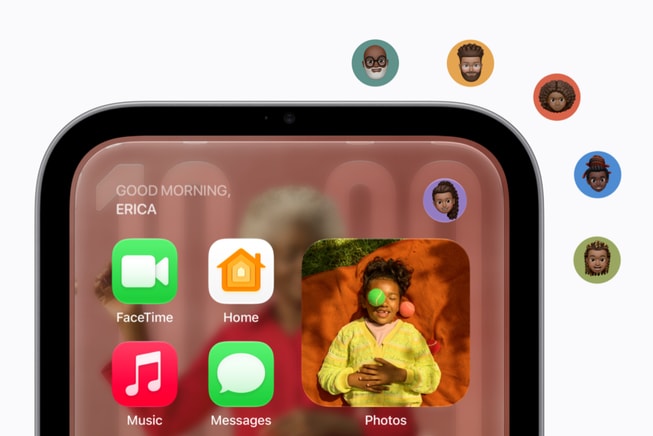
Apple HomeView recognizing different household users

This may be one of HomeView's most interesting features.

It can recognize up to six people in a household by their faces and personalize what appears depending on who's standing in front of it.

That means I could approach HomeView and get information relevant to me, while somebody else in the house could walk up and see their own experience.

Personalized information can include Messages, Calendar events, Reminders, Find My information, music, photos, Siri responses, apps and widgets.

Apple also built privacy protections around that personalization. Sensitive content such as Messages and Calendar information isn't supposed to simply sit there waiting for everyone in the house to read it. HomeView combines facial recognition with the presence and recent unlocking of the paired iPhone or iPad before surfacing certain private information.

Good.

Nobody needs their business sitting on the kitchen counter like today's weather forecast. 😄


 Siri AI Is Supposed to Be the Star 

Apple isn't positioning HomeView around touch controls alone.

Siri AI is at the center of the experience.

The newer Siri is designed for more natural conversations, broader questions and awareness of what's currently appearing on the HomeView screen.

If you pair HomeView with an Apple Intelligence-compatible iPhone or iPad, Siri can also draw from your personal context, including information from Messages, Calendar and other supported apps.

So instead of digging through several apps, you could potentially ask:

  • What's on my calendar today?
  • When is my next appointment?
  • Where did I leave my AirPods?
  • Play the music I was listening to earlier.
  • Turn off the living-room lights.
  • Lock the front door.
  • Set a timer for dinner.

Conversations started with Siri AI on HomeView can also continue on other compatible Apple devices.

That's the type of feature I can see becoming useful — not because I couldn't get the information somewhere else, but because I wouldn't have to stop what I'm doing to go find it.

 The Kitchen Might Be Its Natural Habitat 

I know Apple wants HomeView throughout the house, but I immediately see this thing ending up in kitchens.

HomeView can convert compatible recipes from the web into step-by-step instructions, keep track of ingredients and manage hands-free timers while you're cooking.

Add music, Messages, Calendar information and Siri into the mix and suddenly that countertop placement makes a lot of sense.

You could use it to:

  • Follow recipes.
  • Set several timers.
  • Ask Siri measurement or cooking questions.
  • Listen to music and podcasts.
  • Check a security camera or video doorbell.
  • Make a FaceTime call.
  • Check the family's calendar.
  • Add something to a reminder or shopping list.
  • Control lights, thermostats and compatible appliances.

All without constantly picking up your phone with whatever is currently on your hands.

Yeah... I can see the appeal there.

 FaceTime Could Be Useful for Families 

Apple HomeView using FaceTime and Center Stage

HomeView includes a 12MP Center Stage camera, which automatically helps keep people in frame during FaceTime calls.

For families, I think this could be one of those features that sounds ordinary until you have it permanently available.

Instead of holding your phone throughout a long family conversation, you could leave HomeView on the counter or table and let everybody move around naturally.

Parents could talk to relatives while preparing dinner. Grandparents could have a stationary FaceTime setup that doesn't require holding an iPhone or iPad. Kids could talk with family without somebody surrendering their phone for an hour.

HomeView also supports Intercom, allowing messages to be broadcast to another room or throughout the house using compatible HomeView, HomePod, iPhone, iPad and Apple Watch devices.

That's not revolutionary.

It's convenient.

And convenience is usually why technology earns a permanent spot in our homes.

 It Wants to Be the Control Center for Your Smart Home 

Apple HomeView smart home controls for lights locks thermostat and Intercom

This is probably where HomeView makes the strongest argument for existing.

Apple designed it to act as a central dashboard for compatible smart-home equipment.

That can include:

  • Smart lights
  • Thermostats
  • Door locks
  • Security cameras
  • Video doorbells
  • Blinds and shades
  • Scenes and automations
  • Works with Apple Home accessories
  • Matter-compatible devices

HomeView can control those devices through the touchscreen or by voice using Siri AI.

Its Home Camera face can display as many as nine camera feeds at once, which could be genuinely useful for someone with cameras covering the front door, driveway, backyard and different rooms around the house.

With compatible HomeKit Secure Video cameras and the appropriate iCloud+ subscription, HomeView can also provide recognition for people, familiar faces, pets, packages and vehicles.

It can even listen for the sound of a smoke or carbon-monoxide alarm and send alerts to compatible Apple devices.

If you've already invested heavily in Apple Home or Matter devices, this is probably where your interest level goes up considerably.

 It Can Look Like Something When Nobody Is Touching It 

Apple HomeView customizable faces including photos weather calendars and Snoopy

I'm glad Apple thought about what happens when nobody is actively using the thing.

HomeView offers a selection of customizable faces built around information and decoration.

Options include:

  • Photos
  • Calendar
  • Weather
  • Home Modular
  • Home Camera
  • Flow
  • Snoopy

The Photos face can turn HomeView into a digital picture frame using your photo library or shared albums, while Flow responds to movement in the room with interactive visuals.

And yes, Snoopy gets his own face with animations that can change based on things like the time of day, weather and sporting events.

So at least your $299 screen doesn't have to sit there looking like it has been waiting all day for somebody to give it an assignment.

 Music, Podcasts and Entertainment Are Part of the Package 

Apple HomeView playing music and podcasts

The tabletop HomeView uses two full-range drivers built into the display along with a down-firing woofer and two force-cancelling passive radiators in the base.

Apple is also using computational audio and Spatial Audio to make the system useful as more than a notification speaker.

You can use HomeView for Apple Music, Podcasts, Apple News, Apple TV and compatible third-party audio and video experiences.

There's also Handoff support, so music playing on your iPhone can continue on HomeView when you bring the phone close to it.

Multiple HomeView, HomePod, HomePod mini and AirPlay-compatible speakers can also work together for multiroom audio.

There is one distinction I'd keep in mind, though:

HomeView isn't a miniature iPad.

Don't expect the same open App Store experience where you simply install every iPhone or iPad app you use. Some media experiences can depend on a paired iPhone or AirPlay.

If your primary reason for buying one is watching video, I'd make sure the services you care about fit into Apple's HomeView setup before spending the money.

 Privacy Matters When a Camera Is Sitting in Your House 

This deserves attention because HomeView isn't just another speaker sitting quietly in the corner.

It has a camera, microphones, facial recognition and access to potentially personal household information.

Apple says the A18-powered HomeView uses protected processing environments called Secure Exclaves for camera and microphone information, separating that processing from the rest of the system.

Siri requests can also be processed directly on the device or through Apple's Private Cloud Compute infrastructure when additional processing is necessary.

For personalized content, Messages and Calendar information are only surfaced after the correct person has been recognized and their paired iPhone or iPad is nearby and has recently been unlocked.

Obviously, everyone has a different comfort level when it comes to smart devices with cameras and microphones inside the home.

I'd still take a few minutes to understand the privacy settings before putting one beside my bed or in the middle of the kitchen.

 Tabletop or Wall? 
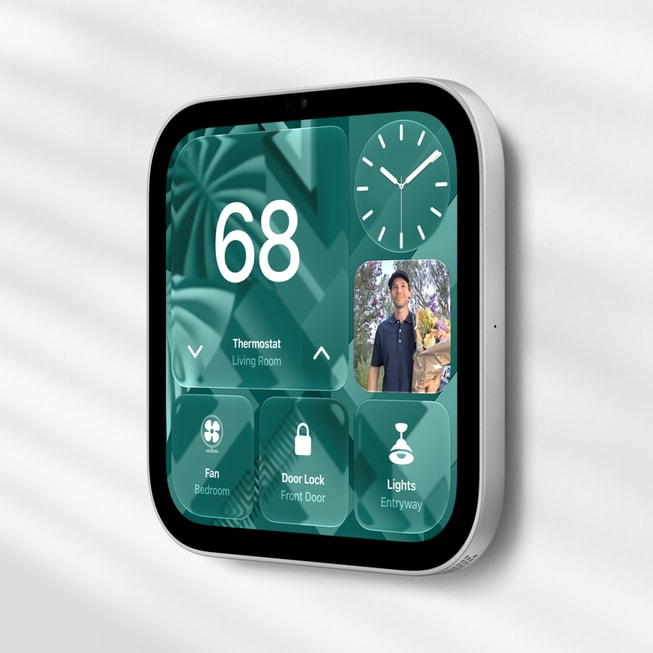
Wall-mounted Apple HomeView smart home display

Both versions of HomeView start at $299.

The tabletop model includes the speaker base and adjustable hinge, while the wall-mounted version is designed for places such as an entryway or hallway.

But there's something you need to know about that wall-mounted option:

The mount costs extra.

Apple's Schneider Home mounting options begin at $59.99 for the USB-C Power Mount and $79.99 for the AC Wired Mount. A PoE Wired option is expected in early 2027 for $129.95.

So a $299 wall-mounted HomeView can quickly become a roughly $358.99-to-$428.95 purchase before tax or any professional installation.

That's worth knowing before you start mentally placing these things throughout the house.

 Does Your Home Actually Need One? 

I think this depends less on HomeView itself and more on the type of household you already have.

If your home already uses things like:

  • iPhones and iPads
  • Apple Music
  • FaceTime
  • Apple Home
  • HomeKit or Matter accessories
  • Shared Apple calendars
  • Reminders
  • Find My
  • iCloud Photos
  • Security cameras
  • Smart locks
  • Smart lighting
  • Smart thermostats

...HomeView starts making considerably more sense.

It's putting information and controls your household already uses into a permanent shared location.

For a family with several Apple users, I could especially see one living in a kitchen, family room or entryway.

But if you don't have many smart-home devices, rarely use Siri and already keep your iPhone or iPad nearby?

Then we come right back to my original question:

Do you really need another screen?

Probably not. And that's okay.

 $299 Is Still $299 

HomeView isn't outrageously expensive compared with some of Apple's other products, but $299 isn't an amount I'd spend just because something would look nice sitting on my counter.

Especially when the device becomes more useful the deeper you already are in Apple's ecosystem.

Siri AI is also arriving as a beta experience, which means some capabilities can continue changing after launch.

We're also dealing with an entirely new Apple product category.

We know what the specifications say and what Apple demonstrated.

What we don't have yet is months of regular people telling us which HomeView features they ended up using every day — and which ones became expensive decorations after the excitement wore off.

That's why I'm interested, but I'm also willing to watch this one for a little while.

HomeView may be new for Apple, but the idea itself isn't new. Amazon's Echo Show family has spent years putting Alexa, video calls, recipes, smart-home controls, music, photos, and glanceable information onto countertop displays. Apple's approach is essentially its own tightly integrated version of that concept, built around Siri AI, FaceTime, Apple Home, Messages, Calendar, Find My, and the rest of the Apple ecosystem.

 So, Who Is Apple HomeView For? 

I'd look hardest at HomeView if you're already deep inside Apple's ecosystem and want a shared household device instead of another personal device.

Families may appreciate personalized calendars, Messages, reminders, Find My and FaceTime.

Smart-home users get a permanent dashboard.

People who spend a lot of time in the kitchen get recipes, timers, music and hands-free Siri.

Security-conscious households can keep compatible cameras and locks close at hand.

And somebody who mainly wants a really nice digital picture frame gets that too.

It's actually a thoughtful combination.

I just wouldn't buy it expecting an iPad for $299.

HomeView becomes more interesting when you stop thinking about it as another screen and start thinking about it as a permanent place for the household to interact with everything Apple already knows how to do.

Whether that's worth $299 depends on how often you'd actually walk up to it.

As for me? I'm an iPhone user, so Apple already has one foot in the door. 😄

But before I give them another spot on my counter, I want to know that HomeView is going to save me enough trips to my phone to earn its place there.

Because my countertops have responsibilities too.

Eyeing the... Tech: Dell XPS 13

Can Dell's most affordable XPS laptop deliver the premium experience the lineup is known for?

I'll admit it—I did a double take when I saw the commercial.

A Dell XPS laptop for under $600? That's not something you hear every day.

The XPS name has been associated with premium Windows laptops for years, often carrying price tags that put them firmly in "save up for it" territory. So when Dell introduced a new XPS 13 with a student price of $599.99 (or $699.99 at its standard retail price), it immediately caught my attention.

As someone who spends plenty of time studying for my certification, researching topics for SDGT Entertainment, and staying connected with family and friends, I appreciate technology that focuses on getting the essentials right. A laptop doesn't have to cost over a thousand dollars to be useful—it just needs to be dependable, comfortable to use, and capable of keeping up with your day.

That's exactly what Dell seems to be aiming for with this latest XPS 13.

So, let's take a closer look.


 Specifications 

Dell has streamlined the XPS 13 into a lightweight notebook designed for everyday productivity, streaming, web browsing, and school or office work.

Display: 13.4-inch 2.5K (2560 × 1600) touchscreen

Processor: Intel Core 5-320 (6-Core, 6MB Cache, up to 4.6GHz)

Graphics: Intel Graphics

Memory: 8GB LPDDR5X

Storage: 512GB PCIe SSD

Operating System: Windows 11 Home

Wireless: Wi-Fi 7 and Bluetooth 6.0

Ports: 2 USB 3.2 Gen 2 (10 Gbps) Type-C with DisplayPort and power delivery

Camera: 1080p Full HD webcam with Windows Hello

Audio and Speakers: Quad-speaker design with 2W Main x 2 Channel + 2W Tweeter x 2 Channel

Weight: Approximately 2.2 pounds with CNC aluminum chassis

Battery: Up to 17 hours of video streaming (Dell estimate)

Power Supply: 65W AC adapter, USB Type-C (2-pin, Wall Mount)


 Price 

Let's talk about the part that surprised me the most.


The new Dell XPS 13 starts at $699.99, while eligible students can purchase it for $599.99 through Dell's education promotion.

For a laptop wearing the XPS badge, that's a pretty significant shift.

Historically, the XPS family has competed against premium ultrabooks and often started well above the $1,000 mark. Seeing Dell bring that design philosophy into a much more approachable price range opens the door for students, young professionals, and anyone looking for a dependable Windows laptop without stretching their budget too far.

Of course, prices can fluctuate throughout the year. Holiday sales, back-to-school promotions, and retailer discounts could make the XPS 13 an even stronger value if you're willing to keep an eye on deals.

The Dell XPS 13 pictured next to the Dell Pro Premium Wireless ANC Headset

 Designed for Everyday Productivity 

One thing I appreciate about this laptop is that Dell isn't pretending it's something it isn't.

The XPS 13 isn't marketed as a gaming powerhouse or a mobile workstation built for professional video editors.


Instead, it's designed for the things many of us actually spend our days doing.

Writing papers.

Managing spreadsheets.

Attending video meetings.

Streaming movies.

Researching assignments.

Editing documents.

Browsing the web with twenty tabs open because we all swear we're going back to read them later.

That's the audience Dell seems to have in mind, and honestly, I think it works.

 A Display That Deserves Attention 

One feature that immediately stands out is the 13.4-inch 2.5K touchscreen display (120Hz).

Higher resolution means sharper text, clearer images, and a more enjoyable viewing experience whether you're reading articles, watching your favorite shows, or reviewing photos.

As someone who spends hours reading technical information and research materials, I know how much a quality display can improve long study sessions. Your eyes tend to appreciate crisp text after several hours of work.


 Performance 

Powered by Intel's Core 5 processor, the new XPS 13 is built around efficiency and everyday responsiveness.

Opening Office applications, juggling browser tabs, participating in Zoom meetings, streaming content, and handling everyday multitasking should all feel comfortable for this system.

Where buyers should pay close attention is the memory configuration.

The base model includes 8GB of LPDDR5X RAM.

For many everyday users, that's still perfectly usable. However, if you're someone who keeps dozens of browser tabs open, edits large creative projects, or expects your laptop to stay with you for many years, you may eventually wish you had more memory.

It's one of those situations where thinking about your own habits is just as important as reading the specifications.


 Battery Life 

Battery life continues to be one of the most important features in any portable laptop.

Dell estimates up to 17 hours of video streaming with the 3Cell, 52 Whr primary battery, although real-world results will naturally depend on screen brightness, applications, wireless usage, and the type of work you're doing throughout the day.

Whether you're taking your laptop between classes, working from a coffee shop, or simply moving from room to room at home, longer battery life means one less thing to worry about.


 Build Quality 

The XPS lineup has earned a reputation for clean, minimalist design, and this latest model continues that tradition.

It's lightweight CNC aluminum, compact, and easy to slip into a backpack or messenger bag without adding much weight.

Sometimes I think we focus so much on processors and benchmarks that we forget something simple: if a laptop is comfortable to carry every day, you're much more likely to actually use it.


 Community Impressions 

Early reactions to Dell's new pricing strategy have been largely positive.

Many people are excited to see the XPS brand become more accessible, especially students looking for a premium-feeling Windows laptop without spending four figures.

The biggest discussion has centered around the 8GB memory configuration. While plenty of buyers feel it's enough for everyday computing, others believe Dell should have started with 16GB, particularly as modern software continues to demand more system resources.

Aside from that conversation, much of the community response has focused on the laptop's attractive display, lightweight design, and approachable price.


 Things to Consider Before Buying 

The Dell XPS 13 could be an excellent choice if you:

  • Need a lightweight laptop for school or work.
  • Spend most of your time browsing, streaming, writing, or using Office applications.
  • Appreciate premium design without paying premium flagship prices.
  • Want a compact Windows laptop that's easy to travel with.


However, if you're planning to edit 4K video, develop games, run engineering software, or play the latest AAA games, you'll likely want hardware with a more powerful processor, dedicated graphics, and additional memory.

Choosing the right laptop isn't about buying the most expensive one. It's about finding the one that fits the way you work every day.

Since the XPS 13 has a minimalist port selection, a USB-C hub like the Dell Pro 4-in-1 Travel Hub is almost essential.

Useful ports include:

  • HDMI 2.0b 4K (3840 x 2160) @60Hz
  • USB-A 3.2 Gen2 (10Gbps, data only)
  • USB-C 3.2 Gen2 (10Gbps, data only)


"You can still game on laptops like this... via games that don't require heavy specs + game streaming platforms (Luna is a perfect example)!" -  Blu 


 Return Trends 

Since this version of the Dell XPS 13 is still relatively new, there isn't enough long-term consumer data to determine whether it experiences higher-than-average return rates.

As more people spend time with the laptop, we'll gain a better understanding of its long-term reliability, battery health, thermal performance, and overall customer satisfaction. At this stage, there are no widespread reports suggesting unusual return patterns.


 Final Thoughts 

Sometimes the most interesting products aren't the ones chasing every cutting-edge feature—they're the ones that make quality technology more accessible.

That's the feeling I get from Dell's newest XPS 13.

It keeps many of the characteristics that made the XPS name so recognizable: a sleek design, a beautiful display, lightweight portability, and dependable everyday performance. The biggest surprise is that it's now available at a price that more people can realistically consider, especially with a monthly plan.

If you've always admired the XPS lineup but assumed it was outside your budget, this might be the model worth taking a closer look at. Whether you're a student, a remote worker, or simply someone looking for a dependable Windows laptop, Dell's latest XPS 13 makes a compelling case that premium experiences don't always have to come with premium price tags.


Eyeing the... Tech: Motorola Moto Pad

A capable Android tablet built for entertainment, productivity, and everything in between.

I'm always fascinated by the tech that quietly shows up without making a ton of noise. Not every device needs a huge launch event or a celebrity commercial to be worth paying attention to. Sometimes the products that surprise you the most are the ones simply trying to do their job really well.

That's exactly how I felt when I started looking into Motorola's Moto Pad.

I'll admit it—I enjoy finding technology that makes everyday life a little easier. Whether it's catching up on a few episodes of a favorite show after work, reading through research for my certification, video chatting with family, or winding down with a game before bed, having the right tablet can make those moments a little more enjoyable.

Motorola isn't trying to reinvent what an Android tablet should be here. Instead, the Moto Pad focuses on offering a large display, dependable hardware, modern software, and a price that's much easier on your wallet than many premium tablets. Honestly, I appreciate that approach. Sometimes "good enough" is exactly what people are looking for, especially when "good enough" still comes with features that make daily use enjoyable.

So, is the Moto Pad worth adding to your shortlist? Let's take a closer look.


 Specifications 

The Motorola Moto Pad is designed for users who want a capable Android tablet without spending flagship-level money. While it doesn't try to compete with premium productivity tablets costing several hundred dollars more, it offers a balanced experience that covers streaming, web browsing, light productivity, gaming, and reading.

Display: 11-inch 2.5K LCD display (2560 × 1600)

Refresh Rate: 90Hz

Processor: MediaTek Helio G100

Memory: 8GB RAM

Storage: 128GB

Expandable Storage: microSD support

Operating System: Android 15

Rear Camera: 13MP

Front Camera: 8MP

Battery: 7,040mAh

Charging: 20W USB-C fast charging

Audio: Quad speakers with Dolby Atmos

Accessories: Compatible with stylus and keyboard accessories (sold separately)

On paper, that's a solid collection of features for a tablet that's aimed squarely at everyday users.


 Designed for More Than Entertainment 

Let's be honest—most tablets spend their lives doing a little bit of everything.

One minute you're watching YouTube, the next you're answering emails, then you're looking up a recipe, reading a book, or helping someone in the family troubleshoot their latest app problem. That's why I like evaluating products based on how people actually use them instead of imagining everyone is editing videos or creating digital artwork.

The Moto Pad seems built around that philosophy.

The 11-inch display gives you plenty of room for multitasking without making the tablet feel oversized, while the 90Hz refresh rate helps everything from scrolling through websites to navigating Android feel noticeably smoother.

If you're someone who enjoys reading articles, browsing social media, or streaming movies after a long day, the larger display is definitely one of the highlights here.


 Performance 

Powered by the MediaTek Helio G100 processor and paired with 8GB of RAM, the Moto Pad is built for everyday performance rather than pushing graphical limits.

Apps should launch smoothly, multitasking should remain responsive, and casual games are expected to run comfortably. More demanding games can still be enjoyed, though you'll likely want to adjust graphics settings for the best experience.

Personally, I appreciate when a company understands who a product is for. Not every tablet needs desktop-level performance if it already handles the tasks most people use every day.


 Audio and Entertainment 

One feature that immediately caught my attention is the inclusion of four speakers with Dolby Atmos support.

If you're someone who enjoys watching Netflix, Disney+, YouTube, or listening to music while cooking dinner or relaxing around the house, better speakers make a bigger difference than many people realize.

Instead of reaching for headphones every time, having fuller, louder sound built directly into the tablet makes the overall experience much more enjoyable.

Sometimes the little quality-of-life improvements end up being the ones you appreciate the most.

 Battery Life 

Battery anxiety is something most of us have experienced at one point or another.

Whether you're traveling, sitting through a long flight, or simply forgetting where you left your charger, having confidence that your tablet can keep going is always a nice feeling.

The Moto Pad includes a 7,040mAh battery designed to support a full day of mixed usage. Depending on what you're doing, whether that's streaming, browsing, reading, or taking notes, most users should comfortably make it through their day before needing to recharge.


 Who Is It For? 

The Moto Pad makes the most sense for people looking for an affordable Android tablet without sacrificing the features that matter most.

It could be a great option if you:

  • Enjoy streaming movies and television shows.

  • Want a larger screen for reading or web browsing.

  • Need a tablet for school or light office work.

  • Like having expandable storage through microSD.

  • Prefer Android's flexibility over other mobile operating systems.

If you're looking for professional creative software, desktop-class performance, or advanced multitasking comparable to premium flagship tablets, you may want to explore higher-end options. However, for everyday users, the Moto Pad appears well-positioned to deliver solid value.


 Community Impressions 

Early conversations surrounding the Moto Pad have been encouraging.

Many people seem to appreciate Motorola's decision to focus on affordability while still including features like a 2.5K display, Dolby Atmos speakers, expandable storage, and Android 15.

Some buyers have naturally compared it with Lenovo and Samsung's mid-range Android tablets, especially since Motorola and Lenovo share ownership. Others are curious to see how long Motorola plans to support the device with software updates.

At this point, most of the discussion revolves around value. People aren't expecting the Moto Pad to replace premium productivity tablets—they're hoping it delivers a dependable everyday experience at a competitive price.

 Things to Consider Before Buying 

Before deciding on any tablet, it's worth thinking about how you'll actually use it.

If you're primarily watching videos, reading, browsing the web, attending online classes, or occasionally playing games, the Moto Pad checks a lot of important boxes.

If you rely heavily on professional creative applications, advanced multitasking, or high-end gaming, you may benefit from investing in hardware designed specifically for those workloads.

Choosing the right tablet isn't about buying the most expensive one—it's about finding the one that fits your routine.

 Price 

One of the first things I look at when a new piece of tech catches my attention is whether it feels like you're getting good value for your money. After all, a product can have an impressive list of features, but if the price doesn't make sense, it's much harder to recommend.

The Motorola Moto Pad carries a suggested retail price of $249.99 USD, positioning it as an affordable Android tablet for students, families, casual users, and anyone looking for a dependable device without stepping into premium tablet pricing.

For that price, Motorola includes an 11-inch 2.5K display with a smooth 90Hz refresh rate, 8GB of RAM, 128GB of storage, expandable microSD support, quad speakers enhanced with Dolby Atmos, and a sizable battery designed to keep up with everyday activities. When you compare that feature set to many tablets in the same price range, the Moto Pad begins to stand out as a strong value proposition.

What I appreciate most is that Motorola doesn't appear to be asking buyers to compromise on the essentials. You're still getting a modern Android experience, a vibrant display for streaming and reading, and enough performance for multitasking, all while keeping the price comfortably below many flagship tablets.

As always, it's worth watching for retailer promotions, seasonal sales, and bundle offers. A $249.99 tablet can become an even more attractive purchase if it's paired with discounts on accessories like a stylus, keyboard case, or protective cover.

For anyone shopping with a budget in mind, the Moto Pad strikes me as the kind of device that's priced to be accessible without feeling stripped down, and that's something I always like to see.

 Return Trends 

Since the Moto Pad is still relatively new in the market, there isn't enough long-term consumer data to identify any meaningful return trends.

As more people spend time with the device, we'll have a clearer understanding of long-term reliability, battery performance, software stability, and overall customer satisfaction. For now, there are no widespread reports suggesting unusual return rates.

 My Take Away 

One thing I've learned over the years is that technology doesn't have to be flashy to be useful.

The Moto Pad isn't trying to compete with every premium tablet on the market, and honestly, I don't think it needs to. Instead, it focuses on delivering the features most people use every single day: a sharp display, dependable performance, expandable storage, immersive speakers, and battery life that should comfortably support everyday routines.

If your goal is finding an Android tablet that offers a nice balance between performance and affordability, the Motorola Moto Pad is certainly one worth exploring. It may not be the loudest name in the tablet space, but sometimes the products that quietly do their job well end up being the ones people appreciate the most.


Eyeing the... Tech: Google Pixel 10a

Google continues to refine its affordable smartphone lineup, but is the Pixel 10a the right fit for your next upgrade?

When it comes to smartphones, there's no shortage of choices. Every year we see new devices promising better cameras, faster performance, smarter AI features, and longer battery life. While flagship phones often steal the spotlight, Google's Pixel A-series has quietly built a reputation for delivering many of those premium experiences at a much more approachable price.

That's exactly what caught my attention with the Google Pixel 10a.

At first glance, it doesn't try to reinvent what made previous Pixel A-series devices successful. Instead, Google has focused on refining the formula with updated hardware, improved charging speeds, a brighter display, and continued investment in its growing suite of AI-powered features. For many people, that may be exactly what they're looking for.

 Specifications at a Glance 

FeatureDetails
Starting Price
$499 (128GB)
Storage Options
128GB, 256GB
Memory
8GB RAM
Processor
Google Tensor G4
Display
6.3-inch Actua pOLED (1080 × 2424)
Refresh Rate
60Hz–120Hz Adaptive
Rear Cameras
48MP Wide + 13MP Ultrawide
Front Camera
13MP
Battery
5,100mAh
Charging
45W wired fast charging, Qi wireless charging
Operating System
Android 16
Security Updates
Up to seven years of OS and security updates
Water Resistance
IP68

Google continues to position the Pixel 10a as a phone that balances everyday performance with long-term software support, making it one of the more attractive options in the mid-range Android market.

 What's New? 

The Pixel 10a doesn't dramatically change the formula established by its predecessor, but several meaningful improvements stand out.

Google has equipped the device with its Tensor G4 processor, giving users access to many of the same AI-powered experiences found on higher-end Pixel devices. The display is brighter than previous generations, fast charging has been improved, and the battery has grown to 5,100mAh for extended daily use. Google also continues its impressive commitment to seven years of Android and security updates, something that remains uncommon at this price point.

 Designed for Everyday Use 

One of the biggest strengths of Google's A-series phones has always been their ability to focus on what most people actually use every day.

The Pixel 10a isn't trying to compete with ultra-premium devices costing twice as much. Instead, it aims to deliver a smooth Android experience for everyday activities like browsing the web, watching videos, taking photos, staying connected with family and friends, navigating with Google Maps, and enjoying Google's AI-powered productivity tools.

For many buyers, that's more important than having every cutting-edge feature available.

 Camera Performance 

Photography continues to be one of the Pixel lineup's strongest selling points.

The Pixel 10a features a dual-camera system consisting of a 48-megapixel main camera paired with a 13-megapixel ultrawide camera. Google's image processing has long been one of the company's biggest advantages, allowing Pixel phones to consistently produce impressive photos even without the largest camera sensors on the market.

Features like Night Sight, Magic Editor, Best Take, and other AI-assisted editing tools continue to make photography approachable for casual users while still providing plenty of flexibility for those who enjoy experimenting with their photos.

 Battery Life 

Battery life is another area where the Pixel 10a looks promising.

Google estimates over 30 hours of typical use, with Extreme Battery Saver extending that figure up to 120 hours under the right conditions. Combined with faster wired charging and Qi wireless charging support, the phone appears well-equipped to handle a full day—and likely more—without frequent trips to the charger.

 Community Impressions So Far 

Early impressions from reviewers and the Android community have generally been positive.

Much of the conversation centers around the Pixel 10a's value. Many appreciate Google's decision to keep the starting price at $499, while continuing to include premium software support and AI features that are often reserved for more expensive devices.

Some discussions have questioned whether existing Pixel 9a owners have enough reasons to upgrade immediately, since both devices share several similarities. Others have pointed out that buyers who value expandable storage or the fastest mobile processors may find stronger alternatives elsewhere.

Overall, however, the Pixel 10a appears to reinforce Google's position as a strong contender in the mid-range smartphone market rather than attempting to compete directly with flagship devices.

 Should You Consider It? 

The Pixel 10a may be a great fit if you:

  • Want a capable Android phone without flagship pricing.

  • Appreciate long-term software and security updates.

  • Enjoy Google's camera processing and AI-powered features.

  • Prefer a clean Android experience without excessive preinstalled software.

  • Plan to keep your phone for several years.

On the other hand, users looking for top-tier gaming performance, extensive hardware customization, or premium flagship materials may want to compare other options before making a decision.

 Return Trends 

Because the Pixel 10a is still relatively new, there isn't enough long-term consumer data to determine whether it experiences unusually high return rates. As more owners spend time with the device, patterns regarding reliability, durability, and overall satisfaction will become clearer. At this stage, there is no widely reported evidence suggesting return rates outside the norm for a smartphone in this category.

 My Take Away 

The Google Pixel 10a feels like a phone that knows exactly what it wants to be.

Instead of chasing flashy features or trying to compete with ultra-premium smartphones, Google has focused on refining an already successful formula. The combination of a bright 120Hz display, Tensor G4 processor, capable cameras, dependable battery life, and seven years of software support creates a package that's easy to appreciate—especially at a starting price of $499.

If you're shopping for a dependable Android phone that balances performance, longevity, and value, the Pixel 10a is certainly one worth keeping on your radar. While only time will tell how it holds up over the long term, everything we know so far suggests Google has another strong contender in its A-series lineup.