

Okay, I'm back! 😄
Life and work have kept me busy for a minute, but apparently consumer tech wasn't interested in waiting for me. Apple has been especially busy, and its newest idea has me looking around my house asking a very reasonable question:
Do I really need another screen in here?
That's essentially the argument Apple has to make with the new Apple HomeView, a $299 smart display designed to sit on a counter, nightstand or table — or live permanently on a wall. It combines a 7-inch Liquid Retina touchscreen, Siri AI, FaceTime, smart-home controls, music, photos, family information and entertainment into one shared device.

Preorders are open now, with U.S. availability beginning November 13, 2026.
On paper, I can already see situations where I'd use it.
But $299 is also enough money for me to ask whether my iPhone can already do most of this.
So let's figure out what HomeView actually adds.
It's More Than an iPad Sitting on Your Counter
At first glance, HomeView almost looks like Apple took a small iPad and attached it to a speaker.
That's not really the idea, though.
The tabletop model has an aluminum speaker base connected to its display through a stainless-steel hinge, allowing you to tilt the screen to a comfortable viewing angle. Apple offers it in silver, starlight, rose pink and space gray. There's also a separate wall-mounted version available in silver and space gray.
The square 7-inch display has a 1088 × 1088 resolution, True Tone and automatic brightness that ranges from 500 nits down to just 0.3 nits for darker rooms or bedside use.
HomeView can even change how much information appears based on how far away you are. Step closer and it can show more detail. Walk across the room and it simplifies what you see so the important information remains readable.
Inside is Apple's A18 chip, along with a 12MP Center Stage camera, four beamforming microphones and an audio system capable of Spatial Audio.
So no, this isn't simply a glorified digital clock.

One Screen, Different People
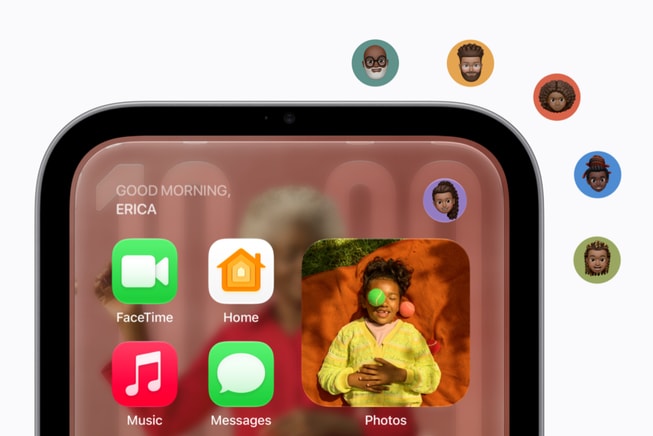
This may be one of HomeView's most interesting features.
It can recognize up to six people in a household by their faces and personalize what appears depending on who's standing in front of it.
That means I could approach HomeView and get information relevant to me, while somebody else in the house could walk up and see their own experience.
Personalized information can include Messages, Calendar events, Reminders, Find My information, music, photos, Siri responses, apps and widgets.
Apple also built privacy protections around that personalization. Sensitive content such as Messages and Calendar information isn't supposed to simply sit there waiting for everyone in the house to read it. HomeView combines facial recognition with the presence and recent unlocking of the paired iPhone or iPad before surfacing certain private information.
Good.
Nobody needs their business sitting on the kitchen counter like today's weather forecast. 😄
Siri AI Is Supposed to Be the Star
Apple isn't positioning HomeView around touch controls alone.
Siri AI is at the center of the experience.
The newer Siri is designed for more natural conversations, broader questions and awareness of what's currently appearing on the HomeView screen.
If you pair HomeView with an Apple Intelligence-compatible iPhone or iPad, Siri can also draw from your personal context, including information from Messages, Calendar and other supported apps.
So instead of digging through several apps, you could potentially ask:
- What's on my calendar today?
- When is my next appointment?
- Where did I leave my AirPods?
- Play the music I was listening to earlier.
- Turn off the living-room lights.
- Lock the front door.
- Set a timer for dinner.
Conversations started with Siri AI on HomeView can also continue on other compatible Apple devices.
That's the type of feature I can see becoming useful — not because I couldn't get the information somewhere else, but because I wouldn't have to stop what I'm doing to go find it.
The Kitchen Might Be Its Natural Habitat
I know Apple wants HomeView throughout the house, but I immediately see this thing ending up in kitchens.
HomeView can convert compatible recipes from the web into step-by-step instructions, keep track of ingredients and manage hands-free timers while you're cooking.
Add music, Messages, Calendar information and Siri into the mix and suddenly that countertop placement makes a lot of sense.
You could use it to:
- Follow recipes.
- Set several timers.
- Ask Siri measurement or cooking questions.
- Listen to music and podcasts.
- Check a security camera or video doorbell.
- Make a FaceTime call.
- Check the family's calendar.
- Add something to a reminder or shopping list.
- Control lights, thermostats and compatible appliances.
All without constantly picking up your phone with whatever is currently on your hands.
Yeah... I can see the appeal there.
FaceTime Could Be Useful for Families

HomeView includes a 12MP Center Stage camera, which automatically helps keep people in frame during FaceTime calls.
For families, I think this could be one of those features that sounds ordinary until you have it permanently available.
Instead of holding your phone throughout a long family conversation, you could leave HomeView on the counter or table and let everybody move around naturally.
Parents could talk to relatives while preparing dinner. Grandparents could have a stationary FaceTime setup that doesn't require holding an iPhone or iPad. Kids could talk with family without somebody surrendering their phone for an hour.
HomeView also supports Intercom, allowing messages to be broadcast to another room or throughout the house using compatible HomeView, HomePod, iPhone, iPad and Apple Watch devices.
That's not revolutionary.
It's convenient.
And convenience is usually why technology earns a permanent spot in our homes.
It Wants to Be the Control Center for Your Smart Home

This is probably where HomeView makes the strongest argument for existing.
Apple designed it to act as a central dashboard for compatible smart-home equipment.
That can include:
- Smart lights
- Thermostats
- Door locks
- Security cameras
- Video doorbells
- Blinds and shades
- Scenes and automations
- Works with Apple Home accessories
- Matter-compatible devices
HomeView can control those devices through the touchscreen or by voice using Siri AI.
Its Home Camera face can display as many as nine camera feeds at once, which could be genuinely useful for someone with cameras covering the front door, driveway, backyard and different rooms around the house.
With compatible HomeKit Secure Video cameras and the appropriate iCloud+ subscription, HomeView can also provide recognition for people, familiar faces, pets, packages and vehicles.
It can even listen for the sound of a smoke or carbon-monoxide alarm and send alerts to compatible Apple devices.
If you've already invested heavily in Apple Home or Matter devices, this is probably where your interest level goes up considerably.
It Can Look Like Something When Nobody Is Touching It

I'm glad Apple thought about what happens when nobody is actively using the thing.
HomeView offers a selection of customizable faces built around information and decoration.
Options include:
- Photos
- Calendar
- Weather
- Home Modular
- Home Camera
- Flow
- Snoopy
The Photos face can turn HomeView into a digital picture frame using your photo library or shared albums, while Flow responds to movement in the room with interactive visuals.
And yes, Snoopy gets his own face with animations that can change based on things like the time of day, weather and sporting events.
So at least your $299 screen doesn't have to sit there looking like it has been waiting all day for somebody to give it an assignment.
Music, Podcasts and Entertainment Are Part of the Package

The tabletop HomeView uses two full-range drivers built into the display along with a down-firing woofer and two force-cancelling passive radiators in the base.
Apple is also using computational audio and Spatial Audio to make the system useful as more than a notification speaker.
You can use HomeView for Apple Music, Podcasts, Apple News, Apple TV and compatible third-party audio and video experiences.
There's also Handoff support, so music playing on your iPhone can continue on HomeView when you bring the phone close to it.
Multiple HomeView, HomePod, HomePod mini and AirPlay-compatible speakers can also work together for multiroom audio.
There is one distinction I'd keep in mind, though:
HomeView isn't a miniature iPad.
Don't expect the same open App Store experience where you simply install every iPhone or iPad app you use. Some media experiences can depend on a paired iPhone or AirPlay.
If your primary reason for buying one is watching video, I'd make sure the services you care about fit into Apple's HomeView setup before spending the money.
Privacy Matters When a Camera Is Sitting in Your House
This deserves attention because HomeView isn't just another speaker sitting quietly in the corner.
It has a camera, microphones, facial recognition and access to potentially personal household information.

Siri requests can also be processed directly on the device or through Apple's Private Cloud Compute infrastructure when additional processing is necessary.
For personalized content, Messages and Calendar information are only surfaced after the correct person has been recognized and their paired iPhone or iPad is nearby and has recently been unlocked.
Obviously, everyone has a different comfort level when it comes to smart devices with cameras and microphones inside the home.
I'd still take a few minutes to understand the privacy settings before putting one beside my bed or in the middle of the kitchen.
Tabletop or Wall?
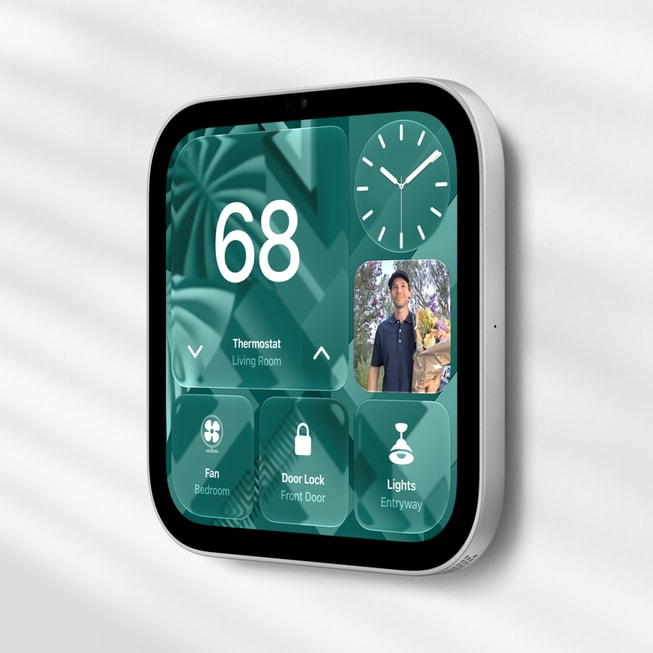
Both versions of HomeView start at $299.
The tabletop model includes the speaker base and adjustable hinge, while the wall-mounted version is designed for places such as an entryway or hallway.
But there's something you need to know about that wall-mounted option:
The mount costs extra.
Apple's Schneider Home mounting options begin at $59.99 for the USB-C Power Mount and $79.99 for the AC Wired Mount. A PoE Wired option is expected in early 2027 for $129.95.
So a $299 wall-mounted HomeView can quickly become a roughly $358.99-to-$428.95 purchase before tax or any professional installation.
That's worth knowing before you start mentally placing these things throughout the house.
Does Your Home Actually Need One?
I think this depends less on HomeView itself and more on the type of household you already have.
If your home already uses things like:
- iPhones and iPads
- Apple Music
- FaceTime
- Apple Home
- HomeKit or Matter accessories
- Shared Apple calendars
- Reminders
- Find My
- iCloud Photos
- Security cameras
- Smart locks
- Smart lighting
- Smart thermostats
...HomeView starts making considerably more sense.
It's putting information and controls your household already uses into a permanent shared location.
For a family with several Apple users, I could especially see one living in a kitchen, family room or entryway.
But if you don't have many smart-home devices, rarely use Siri and already keep your iPhone or iPad nearby?
Then we come right back to my original question:
Do you really need another screen?
Probably not. And that's okay.
$299 Is Still $299
HomeView isn't outrageously expensive compared with some of Apple's other products, but $299 isn't an amount I'd spend just because something would look nice sitting on my counter.
Especially when the device becomes more useful the deeper you already are in Apple's ecosystem.
Siri AI is also arriving as a beta experience, which means some capabilities can continue changing after launch.
We're also dealing with an entirely new Apple product category.
We know what the specifications say and what Apple demonstrated.
What we don't have yet is months of regular people telling us which HomeView features they ended up using every day — and which ones became expensive decorations after the excitement wore off.
That's why I'm interested, but I'm also willing to watch this one for a little while.
HomeView may be new for Apple, but the idea itself isn't new. Amazon's Echo Show family has spent years putting Alexa, video calls, recipes, smart-home controls, music, photos, and glanceable information onto countertop displays. Apple's approach is essentially its own tightly integrated version of that concept, built around Siri AI, FaceTime, Apple Home, Messages, Calendar, Find My, and the rest of the Apple ecosystem.
So, Who Is Apple HomeView For?
I'd look hardest at HomeView if you're already deep inside Apple's ecosystem and want a shared household device instead of another personal device.
Families may appreciate personalized calendars, Messages, reminders, Find My and FaceTime.
Smart-home users get a permanent dashboard.
People who spend a lot of time in the kitchen get recipes, timers, music and hands-free Siri.
Security-conscious households can keep compatible cameras and locks close at hand.
And somebody who mainly wants a really nice digital picture frame gets that too.
It's actually a thoughtful combination.
I just wouldn't buy it expecting an iPad for $299.
HomeView becomes more interesting when you stop thinking about it as another screen and start thinking about it as a permanent place for the household to interact with everything Apple already knows how to do.
Whether that's worth $299 depends on how often you'd actually walk up to it.
As for me? I'm an iPhone user, so Apple already has one foot in the door. 😄
But before I give them another spot on my counter, I want to know that HomeView is going to save me enough trips to my phone to earn its place there.
Because my countertops have responsibilities too.


